
How to Plan WiFi for a New Office Before Moving In
First build a high-performance commercial wireless network from day one with structured planning, structured cabling, and hardware optimization delivered by Trusted Professionals at affordable costs across the UAE.
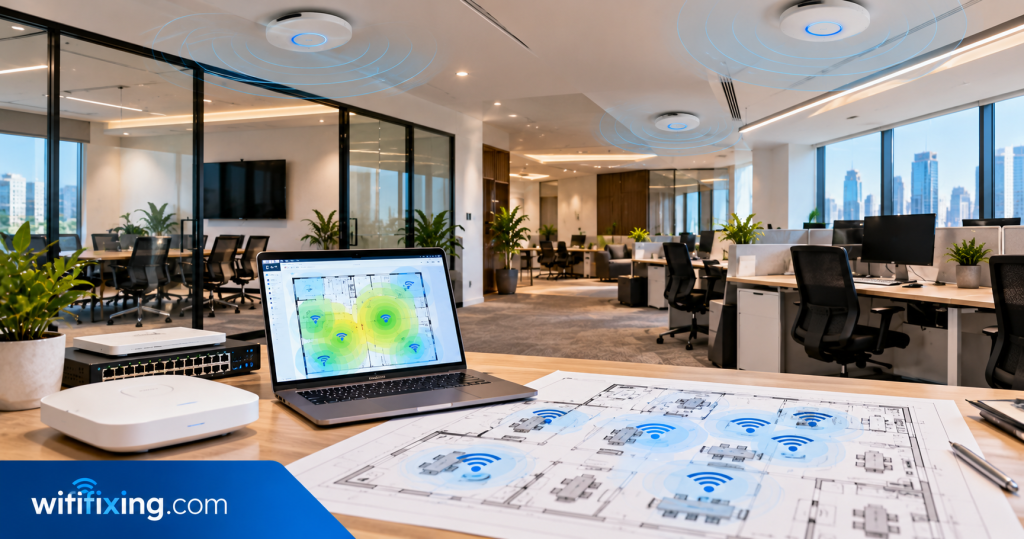
Comprehensive commercial wireless layout assessment, structured data cabling routes, and enterprise access point distribution for new UAE offices.
Why You Should Plan Office WiFi Before Moving In
Are you moving to a new office in Dubai? Then, plan your WiFi before moving day. A good WiFi setup helps your team work without delays. Moreover, it helps staff join video calls, share files, and use online tools smoothly.
However, poor planning can lead to weak signals and slow internet. For this reason, it is best to prepare your office network early. In addition, early planning can save time and reduce extra work while keeping installation at affordable costs.
Secondly At WiFiFixing, our Trusted Professionals help businesses plan office WiFi and network setups. Whether you have a small office or a large workplace, we can help you choose the right solution. Consequently, your team can get online sooner with Reliable Services you can count on.
Essential Steps to Plan Your New Office WiFi Architecture
Follow our practical commercial implementation steps to design a scalable, enterprise-grade wireless network tailored to your workplace.
Check Your Office Layout
First, look at your office floor plan. Mark the desks, meeting rooms, and reception area carefully. Also, mark private offices and shared spaces.
Next, decide which areas need strong WiFi. For example, meeting rooms need a stable connection for video calls. Meanwhile, staff desks need reliable access to business apps. However, walls and doors can affect WiFi signals. Therefore, check the full layout before placing your equipment.
Choose the Right Internet Plan
A good office network needs a suitable internet plan. However, every business has different needs. Therefore, check how your team uses the internet before choosing a plan.
For example, video calls need a steady connection. Before that Large file uploads also need good upload speed. In contrast, basic web browsing may need less bandwidth. Additionally, check both download and upload speeds. This helps you choose a plan that suits your daily work.
Plan WiFi Access Point Locations
WiFi access points help spread the signal across your office. However, poor placement can leave some rooms without good coverage.
First, mark the areas that need strong WiFi. Next, find suitable places for the access points. In most cases, open areas can help signals reach nearby spaces. Furthermore, keep access points away from large objects where possible. For larger offices, a WiFi site survey can help find suitable spots before equipment is fitted.
Install Network Cables Before Moving In
WiFi is useful, but some devices work better with cables. For example, desktop computers and printers may use wired connections. Similarly, meeting room screens may need a direct network link.
For this reason, plan network cabling before the furniture arrives. An empty office makes cable work easier. In addition, early installation can reduce mess later. First, mark the desks and meeting tables. Next, choose the best places for network ports and plan the cable routes.
Choose the Right WiFi Equipment
The right equipment depends on your office size. It also depends on the number of users and devices.
For a small office, a business router and a few access points may be enough. However, a larger office may need network switches and more access points. Before buying equipment, check your needs and think about how your business may grow. Most importantly, choose equipment that fits your office and budget.
Keep Guest WiFi Separate
Office WiFi should be easy to use and safe. For this reason, plan how staff and visitors will connect.
For example, guest WiFi lets visitors use the internet without giving them access to private business files. Therefore, a separate guest network is often a good choice. In addition, use strong passwords to protect your network. Where supported, business WiFi settings can also help control access.
Prepare WiFi for Meetings and Daily Work
Many offices use video calls and online tools every day. Therefore, your WiFi should support these tasks.
First, check which rooms will be used for meetings. Next, estimate how many people may use the network at the same time. Also, check that your internet plan can support daily tasks. Even strong WiFi cannot fix every problem caused by a slow internet service.
Test WiFi Before Moving Day
Installing the equipment is not the final step. You should also test the network before staff arrive.
First, check WiFi in every important room. Next, test the internet on laptops and phones. Also, check meeting rooms and shared work areas. If you find weak spots, fix them before the office becomes busy. Finally, keep a record of the network details for the person managing the office.
Plan for Future Growth
Your business may grow over time. Therefore, plan for more staff and devices from the start.
For example, new employees may need laptops and phones. In addition, your business may add printers, meeting room screens, and other equipment. As a result, the network may need more capacity. Discussing future needs with your installer ensures your network meets current needs while allowing room for growth.
Common Office WiFi Planning Mistakes to Avoid
Some simple mistakes can cause significant network problems later. Therefore, review these points before moving into your new workplace:
When Should You Plan Office WiFi Installation?
Start planning once your office layout is ready. This gives you time to check the internet service and choose the equipment. Next, arrange network cabling before desks arrive.
After that, install the WiFi equipment and test the network. However, some jobs may need more time. Building rules or delays from your internet provider may affect the schedule.
Therefore, allow enough time before moving day. Above all, do not leave the full installation until the last minute. By planning early, you can reduce stress and start work with fewer network issues.
Why Choose WiFiFixing for Office WiFi in Dubai?
Setting up office WiFi takes careful planning. You need to think about coverage, equipment, cables, and network safety. At WiFiFixing, our Trusted Professionals help businesses explore suitable WiFi and networking services.
Our services include office WiFi planning, access point installation, router and switch setup, structured cabling, guest WiFi, coverage checks, and network upgrades. Furthermore, we consider your office layout and daily needs to deliver Reliable Services at affordable costs.
Expert Support Beyond Installation and Delivery
Reliable wireless networking demands consistent professional follow-up long after hardware is installed and powered on. Building modifications, additional smart devices, and service provider modem updates can alter local signal behavior unexpectedly.
WiFiFixing provides truthful guidance and continuous technical assistance throughout Dubai and the UAE. Technicians remain available to verify controller diagnostics, apply firmware security patches, and rebalance radio frequencies whenever neighboring spectrum conditions change.
Our dependable post-installation support ensures that your wireless setup continues running at peak performance without recurring downtime or hidden service fees.
Serving All Over the UAE
Our team of professionals can assist you in setting up WiFi networks, resolving Wi-Fi issues, maintaining Wi-Fi, fixing Wi-Fi, and installing Wi-Fi in Dubai Sharjah, Ajman, Umm Al Quwain, Ras Al Khaimah, Fujairah, Abu Dhabi, etc.
Dubai
coverage includes Mankhool, Business Bay, Jafliya, Bur Dubai, Downtown, Deira, Nad-al-Hamar, oud metha, Jumairah, Downtown Dubai, Nadd Hessa, Ras Al Khor, Umm Ramool, Al Safa, Silicon Oasis, Nad Al Sheba, The Villa, Arabian Ranches 2, Barsha Heights, Mira , Discovery Gardens, Al Qusais, Garhoud, Al Nahda, al rigga , Meydan, Falconcity, Dubai Hills, Meydan South Villas, Liwan, DAMAC Hills,Triangle, Marina, Springs, Arabian Ranches, Barsha ,T Com, Motor City, Greens, Al Awir , Palm Jumairah, Al Jaddaf, Al Khawaneej, Karama, Al Rashidiya, Palm Jumeirah, Al Wasl, Umm Suqeim, Al Warqa’a, Burj Al Arab, Dubai Investments Park, Jumairah Lake Towers – JLT, Discovery Garden, JLT, Jumairah Village Circle, JVC, and Jumairah Village.
Sharjah
encompass Al Zahia, Industrial Area Sharjah, Al Sharq, Al Qadisiya, Bu Tina, Al Jazzat, rashidiya, Al Nahda, Al Majaz, Al Taawun, Al Khan, Muwaileh, and Rolla.
Abu Dhabi
include Mussafah, Khalifa City, Mohammed Bin Zayed City, Al Reem Island, and premier commercial zones.
Ajman
cover residential communities alongside responsive wireless maintenance across Umm Al Quwain, Ras Al Khaimah, and Fujairah near Me.
All Brands We Support
We work with almost every popular router and WiFi system available in the UAE market:
Specialized Wireless Solutions & IT Engineering
Professional on-demand services for corporate sites, temporary event setups, and luxury homes throughout the UAE.
Verified Customer Reviews
Authentic experiences shared by home and business clients across Dubai and the UAE.
“Quickly fixed our Network issues, switch price also very affordable, thank wifi team”
— Sajeesh Mecheri
“Best service and professional approach, solved my issues in a short time”
— Saji Sasidharan
“They supported my ip telephone issues, quick support, affordable price”
— Abdul Bari
“Thank you ,nice wifi service , quick response”
— Zeeshan Ali
“I was having some network issues and with there help the fixed it immediately”
— Alaa
“Quick and fast wifi installation and service”
— hysham
“Thank you, affordable price and quality work”
— Muhammed Rinshid
Helpful Resources & Guides
Consult our engineering articles covering wireless design, hardware comparisons, and best practices.
Our Infrastructure Services in UAE
Access our complete range of specialized on-site cabling, communication, security, and networking solutions.
Frequently Asked Questions About Office WiFi Planning
How do I plan WiFi for a new office effectively?
First, check your office layout, staff numbers, and expected devices. Next, choose a suitable internet plan and plan access point locations, structured cabling, hardware equipment, and network security. Finally, test the connection thoroughly before employees move in.
How many WiFi access points does an office need?
The number depends on office size, internal walls, user counts, and active device density. Therefore, a professional site survey or detailed floor plan assessment helps find the right number and placement without radio interference.
Should network cables be installed before moving in?
Yes, where possible. An empty office makes cable pathways, raised floors, and ceiling trays far easier to access. In addition, early cabling work reduces mess and prevents operational delays after office desks arrive.
Is commercial business WiFi different from residential home WiFi?
Business WiFi is built to support higher client density, managed access points, isolated guest networks, and centralized administrative controls. Commercial hardware handles heavy traffic loads that would overwhelm basic home routers.
When should comprehensive pre-move wireless testing be conducted?
Testing should take place after installation but before staff arrive. Checking wireless coverage, fiber speeds, meeting room connections, and wired links ensures any setting adjustments are resolved before day one.
Popular Searchs
How to Plan WiFi for New Office Dubai, Office WiFi Planning UAE, Commercial WiFi Installation Dubai, Office Network Cabling Dubai, Business WiFi Setup UAE, Office Access Point Installation, Corporate WiFi Solutions Dubai.
Connect With Our Commercial WiFi Specialists
Speak directly with an experienced wireless engineer today for reliable pre-move office assessments, structured cabling designs, and complete enterprise network planning across the UAE.