
How to Extend Your WiFi to an Outbuilding, Shed, or Garage
Eliminate dead zones across detached garages, garden rooms, outdoor workshops, and remote annexes. Engineered with high-capacity outdoor access points, point-to-point wireless bridges, and underground fiber optic or Cat6 backhauls for dependable high-speed connectivity across Dubai and the UAE.
Reliable Internet for Detached Structures: The Modern Connectivity Challenge
Do you struggle to get a reliable WiFi signal in your garage, garden shed, or separate outbuilding? Extending your internet connection beyond your main home can be challenging, especially when thick walls, long distances, and outdoor obstacles weaken wireless signals. With the right equipment and network setup, you can enjoy a more reliable connection wherever you need it. Contemporary lifestyle and work demands require consistent, high-speed data flow across every corner of your property. Garden studios, detached home offices, converted workshops, standalone majlis lounges, and parking garages house vital smart electronics, surveillance cameras, and work terminals that depend upon constant network access.
At WiFi Fixing, we help homes, villas, and businesses explore practical WiFi installation and coverage solutions. Whether you want internet access in a garage workshop, a garden office, or a detached building, choosing the right approach can make a significant difference to your connectivity. Simply repositioning a standard indoor router closer to a window rarely solves the issue over long outdoor distances. Concrete slabs, exterior thermal insulation, metal doors, and atmospheric conditions quickly degrade radio frequencies before they ever reach an exterior structure.
Truthful wireless engineering considers the physical geometry of your property, building materials, and intended bandwidth usage. Our certified team designs and implements structured backhaul systems, enterprise point-to-point wireless bridges, and commercial-grade outdoor access points. Through thoughtful technical design, your outbuilding receives the same stable, high-speed throughput as your primary indoor living spaces, eliminating video call freezes, buffering wheels, and frustrating network dropouts.
Why Is WiFi Weak in Garages and Outbuildings?
WiFi signals become weaker as the distance from the router increases. Walls, metal doors, concrete structures, insulation materials, and other obstacles can further reduce signal strength. A detached garage or outbuilding presents an additional challenge because the signal may need to travel outdoors before passing through another wall. Simply moving your router closer may not provide sufficient coverage, particularly across large properties.
Substantial Structural Distances
Long distances between the main router and the outbuilding cause significant free space path loss. Radio wave energy dissipates rapidly across open yard spaces, leaving insufficient signal amplitude to establish a reliable digital link.
Thick Brick, Concrete, and Insulated Walls
Solid concrete masonry, precast boundary walls, and high-density acoustic insulation absorb high-frequency wireless transmissions. Signals operating on the five gigahertz or six gigahertz bands lose almost all usable power trying to pass through exterior masonry.
Metal Garage Doors and Structural Obstructions
Metal garage doors, steel support columns, aluminum window frames, and corrugated metal roofing panels reflect radio signals rather than allowing them to pass. This reflection creates severe dead zones inside workshops and parking garages.
Neighbouring Wireless Network Interference
Surrounding residential villa networks broadcast overlapping channels that congest the open air. Competing radio noise forces connected devices to repeatedly retransmit corrupted data packets, causing high latency and random disconnections.
Suboptimal Router and Access Point Placement
Placing routers inside closed utility cabinets, behind home entertainment units, or deep within the center of the main house blocks line-of-sight paths toward the exterior garden and outbuilding.
Severe Outdoor Environmental Conditions
High ambient desert heat, intense solar radiation, and airborne dust in the UAE require specialized hardware. Consumer-grade electronic devices placed in non-air-conditioned outbuildings overheat quickly, causing component failure.
Understanding these challenges helps you choose a suitable solution instead of relying on equipment that may not meet your needs. By diagnosing physical constraints early, property owners save time, avoid costly trial-and-error hardware purchases, and establish permanent internet coverage throughout detached spaces.
Proven Ways to Extend WiFi to a Garage, Shed, or Outbuilding
Depending on structural distance, building materials, budget parameters, and performance requirements, our technical team deploys tailored networking methods designed to bridge the digital gap between structures.
Install a WiFi Range Extender
A WiFi range extender receives an existing wireless signal and retransmits it to reach a wider area. This option may work well when your garage or shed is relatively close to the house and a usable WiFi signal already reaches the location. For attached garages or outdoor structures mere feet from an external living room wall, an extender offers an economical entry point.
However, an extender cannot create a strong connection from a signal it cannot receive reliably. Positioning the device where the existing signal is still strong is essential for good results. Because conventional single-band extenders operate in half-duplex mode, retransmitting data packets back and forth on the same radio band cuts total potential bandwidth in half, which may struggle with heavy simultaneous video streaming or gaming.
Use a Mesh WiFi System
Mesh WiFi systems use multiple connected nodes to distribute wireless coverage throughout a property. Depending on the layout, a mesh node placed near an external wall may help extend coverage towards a nearby garage or outbuilding. Mesh hardware features intelligent software management, dynamically routing client traffic across the clearest path back to the primary gateway under a single, unified network name.
For detached buildings, the connection between mesh nodes can still be affected by distance and physical obstructions. Thick masonry walls or thermal double glazing between the main house and outbuilding severely attenuate the wireless backhaul channel between nodes. Deploying a wired Ethernet backhaul to support the exterior node or choosing tri-band mesh systems with dedicated backhaul frequencies ensures reliable, drop-free roaming.
Install an Outdoor WiFi Access Point
An outdoor-rated WiFi access point can provide wireless coverage in suitable exterior areas, such as a covered patio, driveway, or nearby workshop. Mounting a commercial access point high on the exterior wall of the main house casts a strong wireless footprint across open garden spaces, easily penetrating adjacent wooden sheds, light carports, and outdoor pavilions.
These devices are designed for specified outdoor conditions, but correct installation remains important. Choose equipment with an appropriate environmental rating and follow the manufacturer’s requirements for mounting, cabling, and weather protection. Powered directly via Power over Ethernet, these units eliminate the need for exterior electrical outlets. An outdoor access point is most effective when it has a reliable network connection from the main router or network switch.
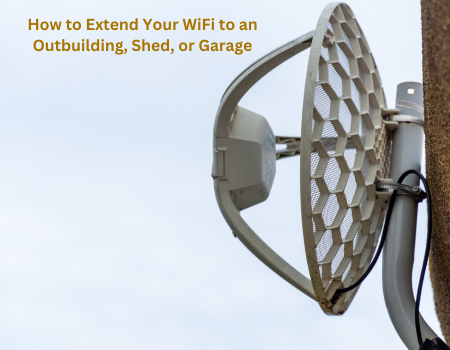
Use a Point-to-Point Wireless Bridge
For a detached garage or outbuilding that is too far away for reliable conventional WiFi coverage, a point-to-point wireless bridge can be an effective solution. This advanced setup establishes a focused, high-throughput invisible data bridge across yards, driveways, or landscaped gardens without digging trenches or laying outdoor physical cables.
This setup uses paired devices to establish a wireless link between two locations. One device connects to the main network, while the other provides a network connection at the outbuilding. A separate access point can then deliver WiFi inside the building. A clear line of sight is often beneficial, and the actual range depends on the equipment, installation conditions, interference, and local regulations. Professional planning can help determine whether this approach is suitable.
Run an Ethernet Cable or Fibre Connection
For a dependable connection, a wired link may be the best choice. Ethernet cabling can connect the main network to an access point in the garage, while fibre may be appropriate for longer distances or installations requiring electrical isolation between buildings. Solid copper shielded Cat6 cables handle gigabit speeds comfortably over distances up to ninety meters, providing a zero-latency highway immune to wireless interference.
Outdoor cabling must be suitable for the environment and installed according to applicable electrical and building requirements. Avoid routing ordinary indoor cable through exposed outdoor areas. Running pre-terminated fiber optic strands inside durable underground conduit completely removes risks associated with ground loops or electrical surges between separate power circuits. Although a wired connection can require more installation work, it often provides a stable foundation for video calls, streaming, smart devices, and other bandwidth-intensive activities.
Which WiFi Solution Is Best for Your Outbuilding?
The ideal setup depends on the distance, construction materials, property layout, and how you plan to use the connection. Identifying your specific usage requirements avoids overspending on unnecessary equipment while guaranteeing that your devices receive uninterrupted data.
A WiFi extender or strategically placed indoor mesh node may be sufficient if the existing signal is strong and the building is constructed from lightweight timber or composite materials.
Mesh WiFi or an outdoor access point may work, depending on the walls and available signal. Positioning access hardware on shared walls bridges dead zones without exterior conduit.
A wired connection or point-to-point wireless bridge may provide more reliable connectivity, overcoming thick concrete blocks, metal roller doors, and vehicle interference.
Ethernet or fibre with a dedicated internal access point can be a strong option for daily remote work, cloud collaboration, high-definition video conferencing, and low-latency VoIP telephony.
A professionally planned network may combine several access points and wired connections. Certified technicians design unified networks that support high device densities, smart lighting, CCTV, and outdoor leisure zones.
Choosing the correct solution from the beginning can help reduce dead zones, unstable connections, and unnecessary equipment costs. Professional consultation ensures that your physical cabling, antennas, and network switches function harmoniously.
How to Improve WiFi Coverage Between Buildings
Before installing new equipment, assess the route between your main router and the outbuilding. Even a small change in device placement can improve the available signal. Systematic positioning and baseline testing lay the groundwork for a reliable extension project.
Place the main router in an open, elevated position. Elevating equipment on a tall shelf or high wall bracket clears furniture, appliances, and floor-level masonry obstacles.
Keep networking devices away from large metal objects, thick mirrors, refrigeration units, and utility electrical panels that deflect or scatter wireless radio beams.
Test WiFi strength near the wall or window facing the outbuilding. Measuring received signal strength indicators (RSSI) reveals whether an exterior access point can be fed wirelessly.
Choose outdoor-rated equipment for exposed installations. Verified ingress protection ratings (IP65, IP67) ensure devices endure scorching UAE summer heat, dust, and humidity.
Use wired backhaul where practical for improved reliability. Feeding remote access points via direct physical cabling eliminates airtime contention and preserves maximum throughput.
Secure your wireless network with modern encryption and a strong password. Applying WPA3 or robust WPA2-Enterprise standards safeguards exterior access points against unauthorized connection attempts.
Check equipment specifications and compatibility before purchasing. Remember that a strong WiFi signal does not automatically mean a fast internet connection. The performance of the complete network also depends on your internet service, equipment capabilities, interference, and the number of connected devices.
Professional WiFi Installation for Villas, Garages, and Garden Offices in Dubai
In Dubai, villas and residential properties may have garages, outdoor seating areas, garden offices, storage buildings, or separate workspaces that need reliable internet access. Properties located across master developments such as Emirates Hills, Dubai Hills Estate, Arabian Ranches, Jumeirah Islands, and Palm Jumeirah frequently feature detached structures situated across extensive landscaped plots. Connecting these detached spaces requires solutions that respect high-end architectural aesthetics, avoid unsightly exposed cabling, and withstand demanding environmental conditions.
WiFi Fixing helps customers explore suitable WiFi installation, troubleshooting, and coverage improvement solutions for different property layouts. Depending on your requirements, options may include mesh WiFi, additional access points, wireless bridges, or wired network connections. Our certified networking engineers ensure discrete cable routing through existing irrigation ducts or perimeter conduits, seamlessly integrating exterior equipment without damaging paving, marble, or manicured gardens.
A properly planned installation can help provide a more consistent connection for work, entertainment, security devices, and smart home systems. With multi-gigabit throughput delivered directly to your detached garage or garden room, you can stream 4K video, attend international video conferences, and operate automated smart locks without worrying about unexpected disconnections.
Why Choose WiFi Fixing?
Every property has different wireless coverage challenges. Our focus is on understanding your requirements and helping you identify a suitable network solution. We prioritize truthful diagnostic evaluations, ensuring that you receive reliable technical guidance and equipment perfectly matched to your physical space and daily internet usage patterns.
When you contact WiFi Fixing, you can discuss:
WiFi installation for homes, villas, and offices, tailored to architectural layouts and high-speed fiber services.
Reliable solutions for garages, garden offices, detached annexes, and outdoor entertainment pavilions.
Root-cause diagnostics for weak signals, high latency, channel congestion, and frequent connection drops.
Permanent solutions for WiFi dead zones and coverage gaps across basements, corridors, and exterior patios.
Mesh WiFi systems, commercial outdoor access points, point-to-point wireless bridges, and enterprise PoE switches.
Full network setup, configuration, channel tuning, and continuous performance improvements as your needs grow.
We aim to make it easier for you to enjoy dependable connectivity at home and at work. Our technicians ensure tidy cable runs, weatherproof exterior terminations, and complete speed testing before completing every project.
Serving All Over the UAE
Our team of professionals can assist you in setting up WiFi networks, resolving Wi-Fi issues, maintaining Wi-Fi, fixing Wi-Fi, and installing Wi-Fi in Dubai Sharjah, Ajman, Umm Al Quwain, Ras Al Khaimah, Fujairah, Abu Dhabi, etc.
Mankhool, Business Bay, Jafliya, Bur Dubai, Downtown, Deira, Nad-al-Hamar, oud metha, Jumairah, Downtown Dubai, Nadd Hessa, Ras Al Khor, Umm Ramool, Al Safa, Silicon Oasis, Nad Al Sheba, The Villa, Arabian Ranches 2, Barsha Heights, Mira , Discovery Gardens, Al Qusais, Al Zahia, Industrial Area Sharjah, Al Sharq, Al Qadisiya, Bu Tina, Al Jazzat, rashidiya, Garhoud, Al Nahda, al rigga , Meydan.
Falconcity, Dubai Hills, Meydan South Villas, Liwan, DAMAC Hills,Triangle, Marina, Springs, Arabian Ranches, Barsha ,T Com, Motor City, Greens, Al Awir , Palm Jumairah, Al Jaddaf, Al Khawaneej, Karama, Al Rashidiya, Palm Jumeirah, Al Wasl, Umm Suqeim, Al Warqa’a, Burj Al Arab, Dubai Investments Park, Jumairah Lake Towers – JLT, Discovery Garden, JLT, Jumairah Village Circle, JVC,Jumairah Village
Sharjah local area names including Al Zahia, Industrial Area Sharjah, Al Sharq, Al Qadisiya, Bu Tina, Al Jazzat, Al Majaz, Al Qasimia, Muwaileh, Al Rahmaniya, Al Suyoh, Al Khan, and Rolla.
Abu Dhabi local area names including Al Reem Island, Saadiyat Island, Yas Island, Al Raha Beach, Khalifa City, Mohammed Bin Zayed City, Al Bateen, Al Mushrif, Al Khalidiya, and Mussafah.
Ajman local area names including Al Nuaimiya, Al Rashidiya, Al Mowaihat, Al Jurf, Al Rawda, Al Rumailah, and Emirates City.
Umm Al Quwain, Ras Al Khaimah, Fujairah, and all neighboring communities near Me.
All Brands We Support
We work with almost every popular router and WiFi system available in the UAE market:
Google Nest WiFi
Fortinet
SonicWall
ASUS
D‑Link
Linksys
Tenda
Ruijie
Huawei
Apple
Buffalo
EnGenius
DrayTek
Xiaomi
TP‑Link
Cisco
MikroTik
Edimax
Ruckus
Belkin
Ubiquiti
Helpful Resources & Guides
Reliable Connectivity Experts
Wi-Fi Support Dubai
Ubiquiti Installation & Maintenance
Ruijie WiFi Configuration
UniFi Controller Support
TP-Link Omada Controller
TP-Link WiFi Dubai
TP-Link Deco Mesh Setup
ASUS AiMesh Dubai
Ruijie Cloud Controller
Grandstream WiFi Installation
ASUS Gaming Router Setup
Ubiquiti UniFi Systems
Netgear Orbi Installation
Managed Service Provider IT
Area Services & Local On-Site Support
WiFi Installation Bur Dubai
WiFi Team JAFZA
WiFi Installation Palm Jebel Ali
WiFi Service Al Qusais
WiFi Installation Al Nahda
WiFi Installation Mirdif
WiFi Installation Muhaisnah
WiFi Installation Al Twar
WiFi Service Deira Dubai
WiFi Installation Al Furjan
WiFi Silicon Oasis
Villa Full WiFi Coverage
WiFi Service Motor City
WiFi Sports City
Specialized Wireless & Network Services
Expert Support Beyond Installation and Delivery
A dependable wireless infrastructure requires proactive lifecycle management. Our senior network engineers provide ongoing firmware updates, automated failover management, spectrum fine-tuning, and immediate on-site technical assistance across all UAE properties.
Verified Customer Reviews
“Quickly fixed our Network issues, switch price also very affordable, thank wifi team”
— Sajeesh Mecheri
“Best service and professional approach, solved my issues in a short time”
— Saji Sasidharan
“They supported my ip telephone issues, quick support, affordable price”
— Abdul Bari
“Thank you ,nice wifi service , quick response”
— Zeeshan Ali
“I was having some network issues and with there help the fixed it immediately”
— Alaa
“Quick and fast wifi installation and service”
— hysham
“Thank you, affordable price and quality work”
— Muhammed Rinshid
Frequently Asked Questions: Extending WiFi to Outbuildings
How can I extend WiFi to a detached garage?
A WiFi extender, outdoor access point, wireless bridge, or wired connection may work, depending on the distance and obstacles. For detached buildings, a point-to-point bridge or a wired connection is often worth considering. Point-to-point wireless systems create an invisible, high-speed radio bridge across open space without digging up gardens, while direct buried Ethernet cables provide complete immunity from external radio frequency interference.
Will a WiFi extender work through garage walls?
It may work if the extender receives a sufficiently strong signal from the main router. Thick concrete, brick, insulation, and metal doors can reduce performance, so placement and testing are important. If the extender is positioned where signal levels have already deteriorated, it merely rebroadcasts high latency and dropped packets, making hardwired access points or wireless bridge kits far superior.
What is the best way to get WiFi into a garden shed?
For a nearby shed, a mesh node or extender may be enough. If the building is far away or separated by substantial obstacles, an outdoor access point connected through a suitable network link may be more reliable. Running an exterior-grade data cable directly to an internal ceiling-mounted access point ensures that office video calls and smart security cameras operate with zero packet loss.
Is an outdoor WiFi access point waterproof?
Some access points are designed for outdoor use and have specified weather-resistance ratings. Always check the manufacturer’s environmental rating and installation instructions rather than assuming every device is waterproof. Quality commercial hardware features IP67 or IP68 ingress protection, ensuring internal electronics withstand pressurized water, dust storms, and extreme summer temperatures across the UAE.
Can I use a point-to-point wireless bridge for my garage?
Yes. A wireless bridge can connect a detached garage to the main network, particularly when there is a suitable mounting location and a reasonably clear line of sight. The equipment must be selected for the distance and installation conditions. Aligned directional transceiver antennas transmit focused radio beams that establish multi-gigabit throughput links without disturbing landscaping.
Is Ethernet better than WiFi for an outbuilding?
A properly installed wired connection generally provides a dependable network link and avoids the signal loss associated with wireless transmission between buildings. A separate access point can provide WiFi inside the outbuilding. Direct physical cabling eliminates packet collision, latency jitter, and environmental attenuation, delivering maximum fiber internet performance.
Do you provide WiFi installation in Dubai?
WiFi Fixing welcomes enquiries for WiFi installation, troubleshooting, and coverage improvement services. Contact us to discuss your requirements and confirm availability in your location. Our certified technicians service residential villas, commercial offices, and industrial warehouses throughout Dubai and the northern Emirates.
Top Searches
Extend WiFi to garage • WiFi for a garden shed • WiFi in a detached garage • Extend WiFi to an outbuilding wirelessly • Outdoor WiFi access point installation • Point-to-point wireless bridge • WiFi coverage solutions Dubai • WiFi installation Dubai • Villa WiFi installation Dubai • Mesh WiFi installation Dubai • long range outdoor wifi • garden office internet setup • wireless bridge uae • outbuilding ethernet cabling • wifi dead zone garage fix • wifi installation • wifi setup • netgear wifi extender setup • install wifi at home near Me.
Knowledge & Resources
Extend Seamless WiFi Across Your Entire Property Today
Eliminate weak outbuilding signals, dropped video calls, and disconnects permanently. Contact our certified network engineers for truthful design advice and prompt on-site survey services across the UAE.